
Hướng Dẫn Tạo Trò Chơi Cờ Caro Nâng Cao
Chào các bạn! Trong bài viết này, chúng ta sẽ cùng nhau xây dựng một trò chơi Cờ Caro đơn giản nhưng có nhiều tính năng thú vị như giới hạn nước đi, pháo hoa khi chiến thắng, chọn chế độ chơi và đếm thời gian.
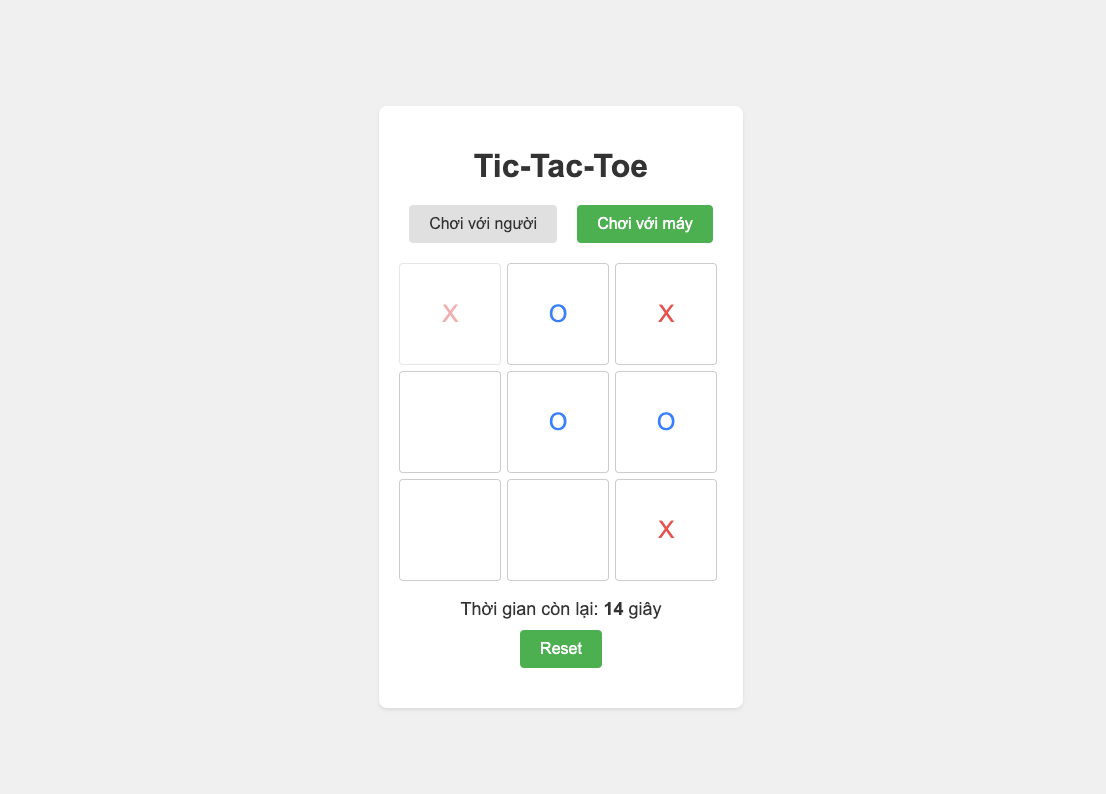
1. Tạo File HTML (index.html)
Đầu tiên, chúng ta cần tạo một file HTML để xây dựng cấu trúc của trò chơi.
<!DOCTYPE html>
<html>
<head>
    <title>Tic-Tac-Toe</title>
    <style>
        /* Các style CSS sẽ được thêm ở bước sau */
    </style>
</head>
<body>
    <div class="container">
        <h1>Tic-Tac-Toe</h1>
        <div id="mode-select">
            <button data-mode="human">Chơi với người</button>
            <button data-mode="computer">Chơi với máy</button>
        </div>
        <div id="gameboard">
            <div class="cell" data-cell-index="0"></div>
            <div class="cell" data-cell-index="1"></div>
            <div class="cell" data-cell-index="2"></div>
            <div class="cell" data-cell-index="3"></div>
            <div class="cell" data-cell-index="4"></div>
            <div class="cell" data-cell-index="5"></div>
            <div class="cell" data-cell-index="6"></div>
            <div class="cell" data-cell-index="7"></div>
            <div class="cell" data-cell-index="8"></div>
        </div>
        <div id="timer-container">
            Thời gian còn lại: <span id="timer">15</span> giây
        </div>
        <button id="reset-button">Reset</button>
        <div id="message-container"></div>
        <div id="win-modal">
            <div id="win-modal-content">
                <h2 id="win-modal-title"></h2>
                <p id="win-modal-text"></p>
                <button id="win-modal-close">Chơi lại</button>
            </div>
        </div>
    </div>
    <script>
        /* Các script JavaScript sẽ được thêm ở bước sau */
    </script>
</body>
</html>
2. Thêm CSS (<style>)
Tiếp theo, chúng ta sẽ thêm các style CSS để trò chơi có giao diện đẹp hơn.
<style>
body {
    font-family: 'Arial', sans-serif;
    display: flex;
    justify-content: center;
    align-items: center;
    height: 100vh;
    margin: 0;
    background-color: #f0f0f0;
}

.container {
    text-align: center;
    background-color: #fff;
    padding: 20px;
    border-radius: 8px;
    box-shadow: 0 2px 4px rgba(0, 0, 0, 0.1);
    position: relative;
}

h1 {
    color: #333;
    margin-bottom: 20px;
}

#gameboard {
    display: grid;
    grid-template-columns: repeat(3, 100px);
    grid-template-rows: repeat(3, 100px);
    gap: 8px;
    margin-bottom: 20px;
    position: relative;
}

.cell {
    width: 100px;
    height: 100px;
    display: flex;
    justify-content: center;
    align-items: center;
    font-size: 24px;
    cursor: pointer;
    border: 1px solid #ccc;
    border-radius: 4px;
    transition: background-color 0.2s ease;
}

.cell:hover {
    background-color: #f0f0f0;
}

.cell.x {
    color: #e55353;
}

.cell.o {
    color: #3880ff;
}

.cell.fade {
    opacity: 0.5;
}

#reset-button {
    padding: 10px 20px;
    font-size: 16px;
    background-color: #4CAF50;
    color: white;
    border: none;
    border-radius: 4px;
    cursor: pointer;
    transition: background-color 0.3s ease;
}

#reset-button:hover {
    background-color: #45a049;
}

#message-container {
    margin-top: 20px;
    font-size: 18px;
    color: #333;
}

/* Modal styles */
#win-modal {
    display: none;
    position: fixed;
    z-index: 1000;
    left: 0;
    top: 0;
    width: 100%;
    height: 100%;
    overflow: auto;
    background-color: rgba(0,0,0,0.5);
    justify-content: center;
    align-items: center;
}

#win-modal-content {
    background-color: #fff;
    color: #333;
    padding: 20px;
    border-radius: 8px;
    text-align: center;
    box-shadow: 0 2px 10px rgba(0,0,0,0.5);
    transform: translateY(-50px);
    animation: slideIn 0.3s forwards;
}

@keyframes slideIn {
    from {
        transform: translateY(-50px);
    }
    to {
        transform: translateY(0);
    }
}

#win-modal-content h2 {
    margin-bottom: 10px;
    font-size: 24px;
}

#win-modal-content p {
    margin-bottom: 20px;
    font-size: 18px;
}

#win-modal-close {
    padding: 10px 20px;
    font-size: 16px;
    background-color: #4CAF50;
    color: white;
    border: none;
    border-radius: 4px;
    cursor: pointer;
    transition: background-color 0.3s ease;
    margin-top: 10px;
}

#win-modal-close:hover {
    background-color: #45a049;
}

/* Fireworks styles */
.firework {
    position: absolute;
    width: 10px;
    height: 10px;
    border-radius: 50%;
    background-color: #f00;
    animation: explode 1s ease-out forwards, flicker 0.1s infinite;
    z-index: 1001;
}

@keyframes explode {
    from {
        transform: translate(0, 0);
        opacity: 1;
    }
    to {
        transform: translate(200px, -100px);
        opacity: 0;
    }
}

@keyframes flicker {
  0% { opacity: 1; }
  50% { opacity: 0.6; }
  100% { opacity: 1; }
}

/* Game mode selection styles */
#mode-select {
    display: flex;
    justify-content: center;
    margin-bottom: 20px;
}
#mode-select button {
    padding: 10px 20px;
    font-size: 16px;
    background-color: #e0e0e0;
    color: #333;
    border: none;
    border-radius: 4px;
    cursor: pointer;
    margin: 0 10px;
    transition: background-color 0.3s ease;
}

#mode-select button:hover {
    background-color: #ccc;
}
#mode-select button.selected {
    background-color: #4CAF50;
    color: white;
}

/* Timer styles */
#timer-container {
    font-size: 18px;
    color: #333;
    margin-bottom: 10px;
}
#timer-container span {
    font-weight: bold;
}
</style>
3. Thêm JavaScript (<script>)
Cuối cùng, chúng ta sẽ thêm các script JavaScript để xử lý logic của trò chơi.
const gameboard = document.getElementById("gameboard");
const cells = document.querySelectorAll(".cell");
const resetButton = document.getElementById("reset-button");
const messageContainer = document.getElementById("message-container");
const winModal = document.getElementById("win-modal");
const winModalTitle = document.getElementById("win-modal-title");
const winModalText = document.getElementById("win-modal-text");
const winModalClose = document.getElementById("win-modal-close");
const modeSelect = document.getElementById("mode-select");
const modeButtons = modeSelect.querySelectorAll("button");
const timerDisplay = document.getElementById("timer");
const timerContainer = document.getElementById("timer-container");

let currentPlayer = "X";
let board = ["", "", "", "", "", "", "", "", ""];
let gameOver = false;
let moveCounts = { X: 0, O: 0 };
let moveHistory = { X: [], O: [] };
let gameMode = "computer";
let timeLeft = 15;
let timerId;

modeButtons.forEach(button => {
    button.addEventListener("click", function() {
        gameMode = this.dataset.mode;
        modeButtons.forEach(b => b.classList.remove("selected"));
        this.classList.add("selected");
        resetGame();
        if (gameMode === "computer" && currentPlayer === "O") {
            startTimer();
            setTimeout(computerMove, 500);
        }
    });
});
modeSelect.querySelector(`[data-mode="${gameMode}"]`).classList.add("selected");

cells.forEach((cell) => {
    cell.addEventListener("click", handleCellClick);
});
resetButton.addEventListener("click", resetGame);
winModalClose.addEventListener("click", resetGame);

function handleCellClick(event) {
    if (gameOver) {
        return;
    }

    const cellIndex = event.target.dataset.cellIndex;

    if (board[cellIndex] !== "") {
        return;
    }

    board[cellIndex] = currentPlayer;
    event.target.textContent = currentPlayer;
    event.target.classList.add(currentPlayer.toLowerCase());

    moveCounts[currentPlayer]++;
    moveHistory[currentPlayer].push(cellIndex);

    if (moveCounts[currentPlayer] > 3) {
        const removedCellIndex = moveHistory[currentPlayer].shift();
        board[removedCellIndex] = "";
        const removedCell = document.querySelector(`[data-cell-index="${removedCellIndex}"]`);
        removedCell.textContent = "";
        removedCell.classList.remove(currentPlayer.toLowerCase(), "fade");
    }
    if (moveCounts[currentPlayer] >= 3 && currentPlayer === "X") {
        const cellToFadeIndex = moveHistory[currentPlayer][0];
        const cellToFade = document.querySelector(`[data-cell-index="${cellToFadeIndex}"]`);
        cellToFade.classList.add("fade");
    }

    const winner = checkWinner();
    if (winner) {
        gameOver = true;
        stopTimer();
        showWinModal(winner);
    } else if (isBoardFull()) {
        gameOver = true;
        stopTimer();
        showWinModal(null);
    } else {
        switchPlayer();
        startTimer();
        if (gameMode === "computer" && currentPlayer === "O") {
            setTimeout(computerMove, 500);
        }
    }
}

function switchPlayer() {
    currentPlayer = currentPlayer === "X" ? "O" : "X";
}

function checkWinner() {
    const winningCombinations = [
        [0, 1, 2],
        [3, 4, 5],
        [6, 7, 8],
        [0, 3, 6],
        [1, 4, 7],
        [2, 5, 8],
        [0, 4, 8],
        [2, 4, 6],
    ];

    for (let combination of winningCombinations) {
        const [a, b, c] = combination;
        if (board[a] && board[a] === board[b] && board[a] === board[c]) {
            return board[a];
        }
    }
    return null;
}

function isBoardFull() {
    return board.every((cell) => cell !== "");
}

function resetGame() {
    board = ["", "", "", "", "", "", "", "", ""];
    gameOver = false;
    currentPlayer = "X";
    messageContainer.textContent = "";
    cells.forEach((cell) => {
        cell.textContent = "";
        cell.classList.remove("x", "o", "fade");
        cell.addEventListener("click", handleCellClick);
    });
    moveCounts = { X: 0, O: 0 };
    moveHistory = { X: [], O: [] };
    winModal.style.display = "none";
    document.querySelectorAll('.firework').forEach(fw => fw.remove());
    stopTimer();
    timeLeft = 15;
    timerDisplay.textContent = timeLeft;
    if (gameMode === "computer" && currentPlayer === "O") {
        startTimer();
        setTimeout(computerMove, 500);
    }
}

function computerMove() {
    if (gameOver) return;

    let bestMove = findBestMove();
    board[bestMove] = "O";
    const cell = document.querySelector(`[data-cell-index="${bestMove}"]`);
    cell.textContent = "O";
    cell.classList.add("o");

    moveCounts["O"]++;
    moveHistory["O"].push(bestMove);

    if (moveCounts["O"] > 3) {
        const removedCellIndex = moveHistory["O"].shift();
        board[removedCellIndex] = "";
        const removedCell = document.querySelector(`[data-cell-index="${removedCellIndex}"]`);
        removedCell.textContent = "";
        removedCell.classList.remove("o", "fade");
    }
    if (moveCounts["O"] >= 3) {
    }

    const winner = checkWinner();
    if (winner) {
        gameOver = true;
        stopTimer();
        showWinModal(winner);
    } else if (isBoardFull()) {
        gameOver = true;
        stopTimer();
        showWinModal(null);
    } else {
        switchPlayer();
        startTimer();
    }
}

function findBestMove() {
    let bestMove = -1;
    let bestScore = -Infinity;

    for (let i = 0; i < board.length; i++) {
        if (board[i] === "") {
            board[i] = "O";
            let score = minimax(board, 0, false);
            board[i] = "";
            if (score > bestScore) {
                bestScore = score;
                bestMove = i;
            }
        }
    }
    return bestMove;
}

function minimax(board, depth, isMaximizing) {
    const scores = {
        X: -1,
        O: 1,
        tie: 0,
    };

    const winner = checkWinner();
    if (winner) {
        return scores[winner];
    }
    if (isBoardFull()) {
        return scores.tie;
    }

    if (isMaximizing) {
        let bestScore = -Infinity;
        for (let i = 0; i < board.length; i++) {
            if (board[i] === "") {
                board[i] = "O";
                let score = minimax(board, depth + 1, false);
                board[i] = "";
                bestScore = Math.max(score, bestScore);
            }
        }
        return bestScore;
    } else {
        let bestScore = Infinity;
        for (let i = 0; i < board.length; i++) {
            if (board[i] === "") {
                board[i] = "X";
                let score = minimax(board, depth + 1, true);
                board[i] = "";
                bestScore = Math.min(score, bestScore);
            }
        }
        return bestScore;
    }
}

function showWinModal(winner) {
    winModal.style.display = "flex";
    if (winner) {
        winModalTitle.textContent = `Người chơi ${winner} thắng!`;
        winModalText.textContent = "Chúc mừng!";
        for (let i = 0; i < 20; i++) {
            createFirework();
        }

    } else {
        winModalTitle.textContent = "Hòa!";
        winModalText.textContent = "Ván đấu kết thúc với tỉ số hòa.";
    }
}

function createFirework() {
    const firework = document.createElement('div');
    firework.className = 'firework';
    const startX = Math.random() * gameboard.offsetWidth;
    const startY = gameboard.offsetHeight;

    const endX = startX + (Math.random() - 0.5) * 300;
    const endY = Math.random() * -200;
    const duration = 800 + Math.random() * 600;
    const delay = Math.random() * 200;

    firework.style.left = `${startX}px`;
    firework.style.top = `${startY}px`;

    firework.style.setProperty('--end-x', `${endX}px`);
    firework.style.setProperty('--end-y', `${endY}px`);
    firework.style.animationDuration = `${duration}ms`;
    firework.style.animationDelay = `${delay}ms`;

    const colors = ['#ff0000', '#00ff00', '#0000ff', '#ffff00', '#ff00ff', '#00ffff'];
    firework.style.backgroundColor = colors[Math.floor(Math.random() * colors.length)];

    gameboard.appendChild(firework);

    setTimeout(() => {
        firework.remove();
    }, duration + delay);
}

function startTimer() {
    stopTimer();
    timeLeft = 15;
    timerDisplay.textContent = timeLeft;
    timerContainer.style.color = "#333";
    timerId = setInterval(updateTimer, 1000);
}

function updateTimer() {
    if (timeLeft > 0) {
        timeLeft--;
        timerDisplay.textContent = timeLeft;
        if (timeLeft <= 5) {
            timerContainer.style.color = "red";
        }
    } else {
        stopTimer();
        const winner = currentPlayer === "X" ? "O" : "X";
        gameOver = true;
        showWinModal(winner);
    }
}

function stopTimer() {
    clearInterval(timerId);
}
</script>
Giải Thích Code
HTML: - Tạo cấu trúc trò chơi với các phần tử như bảng game, nút reset, thông báo, modal và bộ đếm thời gian.
- Thêm các nút chọn chế độ chơi "Chơi với người" và "Chơi với máy".
CSS: - Style cho bảng game, các ô cờ, nút bấm, modal và hiệu ứng pháo hoa.
- Tạo hiệu ứng mờ cho các ô cờ khi đến lượt bị xóa.
JavaScript: -
handleCellClick(): Xử lý khi người chơi click vào một ô cờ.-
switchPlayer(): Chuyển lượt chơi giữa người chơi X và O.-
checkWinner(): Kiểm tra xem có người chiến thắng hay không.-
isBoardFull(): Kiểm tra xem bảng cờ đã đầy chưa.-
resetGame(): Khởi tạo lại trò chơi.-
computerMove(): Xử lý lượt đi của máy (nếu chọn chế độ chơi với máy).-
findBestMove()vàminimax(): Tìm kiếm nước đi tốt nhất cho máy sử dụng thuật toán Minimax.-
showWinModal(): Hiển thị modal thông báo người chiến thắng hoặc hòa.-
createFirework(): Tạo hiệu ứng pháo hoa.-
startTimer(),updateTimer(),stopTimer(): Quản lý bộ đếm thời gian cho mỗi lượt đi.
Cách Chơi
Chọn chế độ chơi:
- Nhấn vào nút "Chơi với người" để chơi cùng bạn bè.
- Nhấn vào nút "Chơi với máy" để chơi với máy tính.
Chơi:
- Người chơi X đi trước, sau đó đến người chơi O.
- Mỗi người chơi có 15 giây để đi một nước, nếu không sẽ bị xử thua.
- Sau 3 nước đi, nước đi đầu tiên sẽ bị làm mờ và sau đó bị xóa ở nước đi tiếp theo.
Kết thúc:
- Trò chơi kết thúc khi có người thắng hoặc hòa.
- Modal thông báo kết quả sẽ hiện lên cùng với pháo hoa nếu có người thắng.
- Nhấn nút "Chơi lại" để bắt đầu ván mới.
Mở Rộng
Bạn có thể mở rộng trò chơi này bằng cách thêm các tính năng sau:
Thêm âm thanh khi có người đi, khi thắng, khi hết giờ.
Tùy chỉnh kích thước bảng cờ.
Thêm các cấp độ khó cho máy tính.
Lưu lại lịch sử các ván chơi.
Chúc các bạn có những giây phút thư giãn thú vị với trò chơi Cờ Caro này!